

Amazon Advertising Cost of Sales (ACoS) is one of the core metrics Amazon itself uses to evaluate PPC performance. It compares how much you spend on ads to the revenue those ads generate, helping you see whether your campaigns are cost-efficient or just burning through budget.
Most sellers want the same holy grail: high sales volume with a low ACoS. But Amazon makes a critical point in its own documentation: chasing the lowest possible ACoS isn’t always the right move. New campaigns often start with a higher ACoS. Some strategies deliberately accept higher ACoS to drive rank, brand awareness, or long-term growth.
In this guide, we’ll combine Amazon’s official definitions with a practical agency lens. You’ll see what ACoS is, how to calculate it, how it relates to ROAS and TACoS, how to set “good” ACoS targets for your brand, and how to optimise campaigns without obsessing over a single number.
Key Takeaways
- ACoS (Advertising Cost of Sales) compares your ad spend to ad-attributed revenue. It shows the percentage of your ad sales that goes toward advertising.
- Amazon defines ACoS as a key KPI for Sponsored Products (and other PPC formats), but stresses that it’s not the only metric that matters. CTR, CVR, impressions, ROI, and TACoS all belong in the conversation.
- Formula:
- ACoS = (Ad Spend ÷ Ad Revenue) × 100
- ROAS = Ad Revenue ÷ Ad Spend (the inverse of ACoS)
- ACoS = (Ad Spend ÷ Ad Revenue) × 100
- There is no universal “good” ACoS. You must map ACoS to your profit margin, break-even point, and campaign goals (sales, awareness, and efficiency).
- To reduce ACoS, Amazon recommends optimising keywords, structure, and creative—not just lowering bids. That includes using enough relevant keywords (e.g., a broad mix of phrase, broad, product, and brand terms for Sponsored Brands) and focusing on high-intent, well-matched queries.
- The smart play is to treat ACoS as one piece of your Amazon advertising strategy—not the entire scorecard.
What is ACoS on Amazon? (Advertising Cost of Sales Explained)
Amazon describes Advertising Cost of Sales (ACoS) as a metric that measures the performance of its pay-per-click (PPC) campaigns. In simple terms, it compares how much you spend on an ad campaign to the revenue it earns.
ACoS is especially important for Sponsored Products, but the same logic applies across Sponsored Brands and Sponsored Display. When Amazon talks about whether campaigns are “cost-efficient,” it is usually referring to ACoS and ROAS.
At a practical level, ACoS answers:
“For every dollar in sales my ads generate, how much did I pay Amazon in advertising fees?”
A lower ACoS suggests your ad spend is more efficient. A higher ACoS means more of your ad-attributed revenue is being eaten by ad costs. The trick is understanding where that line should sit for your products and your margins.
How to Calculate ACoS: Formula and Examples
Amazon’s own definition uses a very straightforward formula:

If you spend $50 on an ad campaign and earn $100 in sales from that campaign, you calculate:
- ACoS = (50 ÷ 100) × 100 = 50%
That means half of your ad-attributed revenue was spent on advertising.
ROAS: the inverse of ACoS
Amazon also calls out ROAS (Return on Ad Spend) alongside ACoS:

Using the same example:
- Ad spend = $50
- Ad revenue = $100
- ROAS = 100 ÷ 50 = 2 (or 200%)
ACoS and ROAS measure the same relationship:
- ACoS tells you what percentage of revenue went to ads.
- ROAS tells you how many dollars of revenue you get per dollar of spend.
Both are useful. Amazon encourages advertisers to look at them together to build a comprehensive view of campaign performance.
ACoS vs ROAS vs TACoS: Understanding the Differences
Amazon focuses on ACoS and ROAS inside its own documentation, but for account-level strategy, you also need TACoS (Total ACoS) in the mix.
- ACoS → Ad Spend ÷ Ad Revenue (only sales attributed to ads)
- ROAS → Ad Revenue ÷ Ad Spend (inverse of ACoS)
- TACoS → Ad Spend ÷ Total Sales (ad + organic revenue)
From Amazon’s lens:
- ACoS shows whether a specific campaign or ad type (like Sponsored Products) is cost-efficient.
- ROAS presents the same data from the return side, which many advertisers find easier to compare.
From a broader strategy lens:
- TACoS tells you how ad spend relates to overall business performance, not just what the console credits to a campaign.
If ACoS looks high but TACoS is stable or falling while total sales rise, it can mean your campaigns are doing their job: they’re pushing rank, growing organic, and lifting your whole account. If both ACoS and TACoS are rising, you may be overpaying for each sale without realizing long-term benefits.
What is a Good ACoS on Amazon?
Amazon is very explicit on this point: there is no single “good ACoS” number.
The “right” ACoS depends on:
- Your industry and category
- Your company size and margins
- Your campaign objectives (profit, growth, or awareness)
- How frequently you run campaigns and what role they play in your funnel
Instead of chasing a fixed benchmark, Amazon recommends that brands anchor ACoS in profit margin and break-even ACoS, then work backward from goals to a target ACoS.
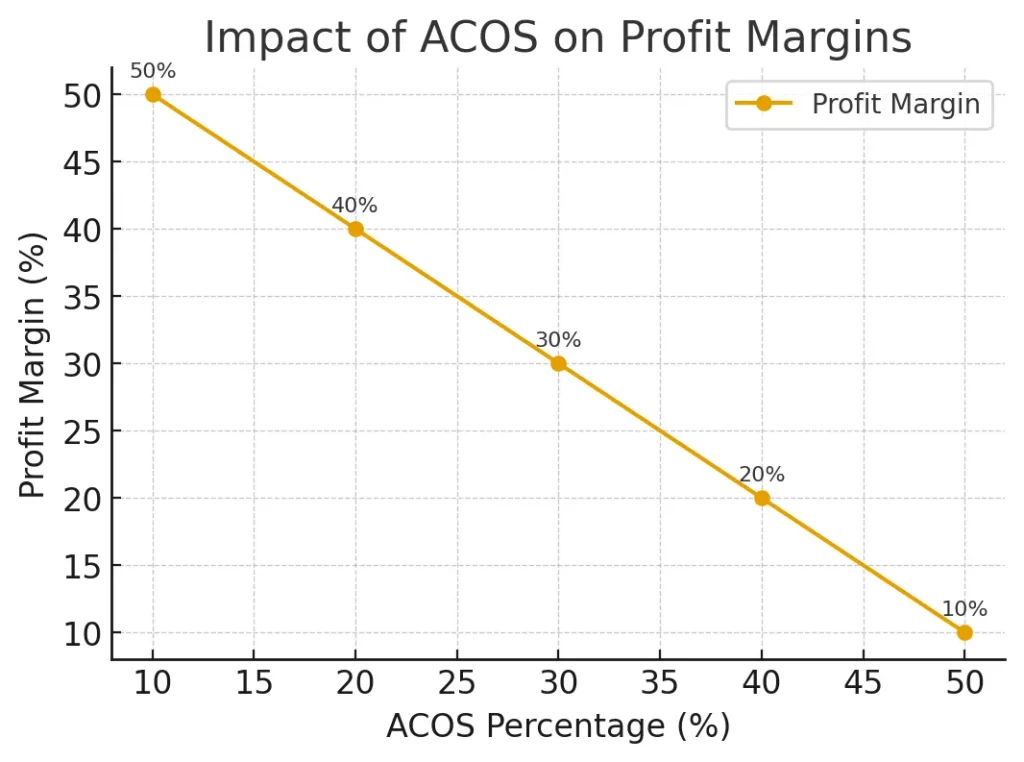
Understanding profit margins
Profit margin is simply the money left after covering all costs—production, Amazon fees, shipping, and overhead. If a product sells for $40 and all costs add up to $28, your profit is $12, and your margin is 30%.
This matters because your ACoS must be below this threshold to make money from ad-driven sales.
Break-even ACoS
Amazon frames break-even ACoS as directly linked to your profit margin:
To maintain a profit, your ACoS needs to be lower than your profit margin.
If your margin is 30%, then:
- 30% is your break-even ACoS.
- ACoS below 30% → you’re making money on ad-attributed sales.
- ACoS above 30% → you’re spending more on ads than you’re earning from those orders.
This is why “good ACoS” is relative. For a high-margin premium brand, 35% ACoS might be acceptable. For a low-margin commodity product, even 20–25% might be too high.
Key Factors That Impact Your ACoS
Amazon describes ACoS as one of many key performance indicators (KPIs). To understand why your ACoS looks the way it does, you need to connect it to other metrics:
- Impressions – how often your ads are shown
- Click-through rate (CTR) – how often shoppers click after seeing your ads
- Conversion rate (CVR) – how often clicks turn into purchases
- Return on investment (ROI) – broader view of investment vs return
From a practical standpoint, several factors shape ACoS:
- Relevance and keywords: Targeting the wrong queries drives clicks from the wrong shoppers, which increases ACoS. Amazon explicitly calls out the importance of using relevant keyword sets, including phrases, broad keywords, and product or brand names—especially for Sponsored Brands.
- Bid levels and CPC: Higher bids increase cost per click. If conversion doesn’t improve with that extra spend, ACoS rises.
- Listing quality: Weak images, titles, bullets, and A+ content drag down conversion and push ACoS up, even if your targeting is solid. We see this a lot in accounts with catalog and PPC issues—flat file errors, suppressed listings, or broken variations quietly inflate ACoS.
- Pricing and offer quality: Losing the Buy Box, uncompetitive prices, or poor offer positioning all lower conversion and inflate ACoS.
Amazon’s guidance is effectively: don’t stare at ACoS in isolation. Instead, review CTR, CVR, impressions, and ROI alongside ACoS to understand which campaigns are efficient and which are inefficient.
Proven Strategies to Lower and Optimize ACoS
Amazon highlights several levers brands can use to improve ACoS: optimising targeting, reviewing campaign performance, and using the right keyword mix. In practice, that looks like this.
1. Audit which campaigns are actually working
Start by comparing high-performing and underperforming campaigns:
- Where is ACoS low and sales strong?
- Where is ACoS high with weak results?
Amazon suggests using these comparisons to decide where your funds should be going and where you can reduce or reallocate spending.
2. Refine your keywords and match types
If you’re overspending on ads, Amazon recommends looking closely at your keyword strategy:
- Remove or down-bid keywords that drive spend but not conversions.
- Add better-matched search terms from your reports as exact or phrase matches.
- Use negatives to block irrelevant or low-intent queries.
For Sponsored Brands, Amazon recommends explicitly using a broad mix of at least a couple dozen keywords, including phrase, broad, product, and brand-name terms. The idea is to create enough coverage while staying relevant so you can reach a wider but still qualified audience.
3. Optimise your creatives and product pages
Amazon’s case studies show brands improving ACoS by updating content and branding—new creative, better product detail pages, and clearer offers. When your ad creative and listings match shopper intent and answer key questions, conversion goes up, and ACoS naturally comes down.
4. Decide your target ACoS based on goals
Amazon advises brands to:
- Calculate break-even ACoS from profit margins.
- Compare the current ACoS against the break-even.
- Decide primary goals: more sales, more brand awareness, or tighter profitability.
If your top priority is sales growth or awareness, you might tolerate ACoS near or even above break-even for a period. If the goal is profitable scaling, you’ll set a target below break-even and optimise until you consistently hit it.
Steps to Detect and Correct ACoS Spikes
Amazon notes that new campaigns often have high ACoS simply because they’re new. That doesn’t automatically mean failure—but you still need a process when ACoS spikes unexpectedly.
A simple framework:
- Check campaign age and data volume
If the campaign is brand new or the date range is too short, high ACoS may just mean it hasn’t had enough time or clicks to settle. - Review keyword performance
Look at search terms and keyword metrics. Are there queries generating cost with little or no revenue? These are your first candidates for bid cuts or negatives. - Inspect CTR and CVR
If CTR drops, your ads may no longer match shopper expectations or competitive visibility. If CVR drops, something on the listing, price, or offer side may have changed. - Compare to profit margin and break-even ACoS
Decide if the spike is acceptable (for a launch, test, or brand play) or if it’s unsustainable based on your margin. - Apply focused changes and re-measure
Make targeted adjustments—keyword pruning, bid changes, listing updates—and review ACoS again over the next 7–14 days, not just 24 hours later.
This aligns with Amazon’s core guidance: diagnose using multiple metrics, not just ACoS.
Tools and Automation for ACoS Management
Amazon’s own environment provides several tools to help manage ACoS:
- The Advertising Console shows ACoS, ROAS, CTR, CVR, and more at campaign, ad group, keyword, and product levels.
- Sponsored Products and Sponsored Brands offer reporting to identify which targeting combinations work best.
- You can use bulk operations and rules-based bidding to adjust bids based on ACoS or ROAS thresholds.
Outside Amazon, advertisers often layer in third-party tools or agencies that specialise in:
- Automated bid optimisation based on ACoS/ROAS targets
- Search term mining and negative keyword management
- Creative testing and performance reporting
Amazon’s own case studies feature brands partnering with agencies and software tools to improve ACoS and ROAS by refining content, experimenting with Sponsored Products and Sponsored Brands, and using data-driven optimisation over time.
The key is to treat automation as support for your strategy, not a replacement for understanding what ACoS means for your margins.
FAQs
ACoS tells you how much of your Sponsored Products revenue is being spent on advertising. A lower ACoS usually indicates your Sponsored Products campaigns are cost-efficient: your targeting, bids, and product pages are aligned with shopper intent. A higher ACoS suggests you may be overspending relative to what you’re earning, or that the campaign is still in a test or launch phase.
Amazon points out that new campaigns often have higher ACoS, simply because they are still learning which keywords, creatives, and audiences resonate. For new products, a “good” ACoS is whatever level makes sense relative to your profit margin and goals. Many brands accept ACoS closer to break-even during launch while they build data, reviews, and rank, then aim to bring ACoS down as the product matures.
No. ACoS is calculated as ad spend divided by ad-attributed revenue, expressed as a percentage. If a campaign has spent but no sales, ACoS is effectively infinite or undefined—not negative. If there is no spend, ACoS is zero. A “negative ACoS” doesn’t exist mathematically in Amazon’s model.
Amazon treats ACoS as one of several KPIs, not something to panic over daily. Many advertisers monitor ACoS regularly (daily or several times a week for high-spend campaigns) but make optimisation decisions on a weekly or bi-weekly basis using consistent lookback windows. That gives enough data for trends to be meaningful and helps you avoid overreacting to normal day-to-day variation.
Conclusion
Amazon’s own documentation is clear: ACoS is essential, but it’s not everything.
ACoS shows how efficiently your ads convert spend into revenue. ROAS flips that view to show return. TACoS steps back and tells you whether your advertising investment is supporting the entire business, not just ad-attributed orders. Profit margins, break-even ACoS, CTR, CVR, impressions, and ROI all sit around these metrics and give them context.
If you focus only on driving ACoS as low as possible, you risk sacrificing sales growth, rank, and brand awareness. If you ignore it, you risk paying more for campaigns than you earn back. The sweet spot is using ACoS the way Amazon intends: as a single core KPI that fits into a broader, margin-aware strategy.
Know your margins. Calculate your break-even ACoS. Decide what matters most for each campaign—sales, awareness, or efficiency. Use ACoS, ROAS, TACoS, and the surrounding metrics to guide adjustments. When you do that, ACoS stops being a stress-inducing number on a dashboard and becomes a clear signal that helps you run smarter, more profitable advertising on Amazon. If you’d rather have specialists own the numbers, our Amazon PPC management services can align bids, budgets, and ACoS targets with your real margins.