

On Amazon, keywords are your storefront sign, your sales assistant, and your targeting strategy all rolled into one. Understanding Amazon Listing Keywords is essential if you want to maximise your product’s visibility and reach the right shoppers.
That’s where Amazon listing keywords come in. They’re not just a field you fill out in Seller Central; they’re the backbone of how Amazon understands what you sell and when it should put you in front of a buyer.
In this guide, we’ll walk through why these keywords matter so much, the types you actually need, how Amazon interprets them, and how to turn research into rankings and revenue instead of another spreadsheet that never gets used.
If your listings are live but traffic and sales feel totally random, the issue probably isn’t your product. It’s the keywords you’re feeding Amazon.
Key Takeaways
- Amazon listing keywords determine who actually sees your product and which searches you can realistically rank for.
- You need an intentional mix of core, long-tail, attribute, branded, and backend keywords, not a random dump of terms.
- Amazon doesn’t just “read” your keywords; it watches how shoppers respond to them and ranks you based on performance.
- The best strategies start with shopper language, then refine it using Amazon data and a few focused tools.
- Keyword work isn’t a one-time project; it’s an ongoing process that supports both organic ranking and PPC efficiency.
Why Amazon Listing Keywords Determine Your Success
Every Amazon search starts with a buyer typing in a problem, a need, or a product idea.
“Glass meal prep containers with lids.”
“Wireless gaming mouse.”
“Organic dog treats.”
Behind the scenes, Amazon is trying to answer one basic question: Which products are most likely to satisfy this person? To decide, it needs two things. First, a clear understanding of what each product actually is. Second, proof that other shoppers have had a good experience when searching for something similar.
Your Amazon listing keywords are what you use to tell the algorithm, “This product is a strong candidate for this kind of search.” If you never mention “glass meal prep containers” in your title, bullets, or backend fields, Amazon has no reason to believe your listing is the right answer for that query, no matter how good your offer is.
That’s why keywords end up driving so much of your success:
Amazon listing keywords decide whether you’re even in the conversation when a shopper searches. They also help Amazon group you into the right category and context. That positioning becomes the foundation of both your organic visibility and your ad strategy. Get them wrong, and everything downstream—impressions, clicks, conversions, ACoS—gets harder.
Types of Amazon Keywords
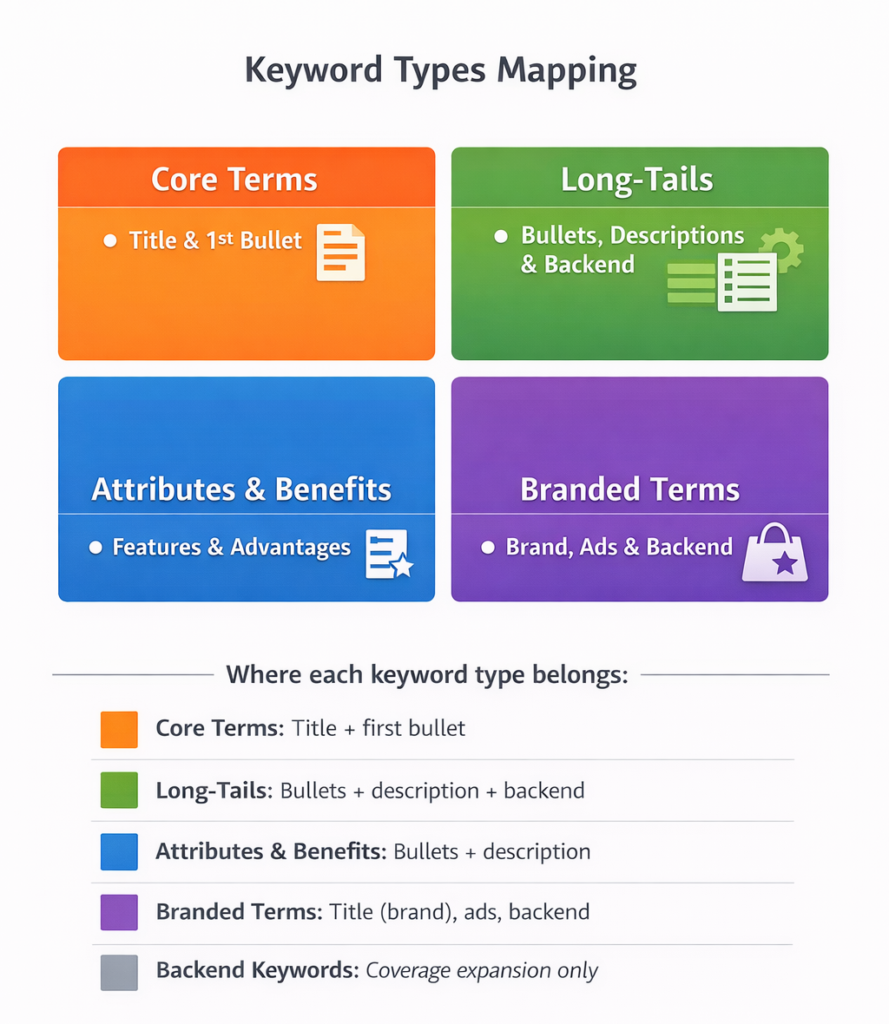
One reason keyword work feels overwhelming is that sellers treat all keywords the same. In reality, different keyword types play different roles in a healthy listing.
Think about it in a few simple buckets.
Core or primary keywords are the phrases that define what your product is. If you sell a set of glass containers with locking lids, “glass meal prep containers” or “glass food storage containers with lids” are your core terms. These belong front and center: in your title, early bullets, and overall positioning. When Amazon tries to understand your product at a glance, this is the language you want it to see.
Around that, you have long-tail keywords. These are longer, more specific phrases, such as “glass meal prep containers for freezer” or “portion control glass meal prep containers.” Each one tends to have lower search volume, but the person typing it usually knows what they want. Long-tails are great for bullets, description, and backend fields because they let you show up for highly targeted, high-intent searches.
Next are attribute and benefit keywords. These describe what your product is made of, what it does, and who it helps: “BPA-free,” “leak-proof,” “microwave safe,” “for work lunches,” “for college students,” and so on. They matter because many searches are built around these modifiers. Someone might search “leakproof glass lunch containers” long before they ever type a brand name.
You’ll also deal with branded keywords. That includes your own brand, any “compatible with…” terms you’re allowed to use, and, in some contexts, competitor brands (usually inside ads rather than public listing copy). Branded terms help you defend your own search presence and show up when buyers are already looking for you by name.
Finally, there are backend keywords, the hidden search terms you add in Seller Central. Shoppers never see them, but Amazon does. This is where you tuck in extra long-tails, synonyms, common misspellings, and sometimes translations. Backend fields are not where you dump every word you can think of; they’re where you extend your reach cleanly without cluttering the page.
Once you see these buckets clearly, keyword planning stops being “how many words can I squeeze in?” and becomes “which roles do I need to cover, and where?”
How Amazon Interprets Keywords and Relevance
Including a keyword is the starting line, not the finish.
When Amazon scans your listing, it first checks whether the language you use matches what the shopper typed. If someone searches “glass meal prep containers,” and that exact phrase (or a very close version) appears in your title and bullets, you pass the basic relevance check. If it doesn’t, you’re already at a disadvantage.
But relevance alone doesn’t earn you a strong position. Once Amazon starts showing your product for that query, it watches what happens next:
- Do shoppers click through to your listing in the search results?
- Do they buy once they land on your page?
- Do they leave positive reviews and keep the product, or return it?
If your listing gets impressions for “glass meal prep containers” but people scroll past you or bounce quickly, Amazon learns that you’re not a great answer for that search, no matter how many times you stuffed the phrase into your bullets.
The last piece is consistency. When your listing copy, backend terms, and advertising all tell the same story, Amazon becomes more confident about where to place you. If you’re running Sponsored Products campaigns on “glass meal prep containers,” your title clearly says “glass meal prep containers with locking lids,” and those clicks often turn into purchases, you’re giving Amazon a very clean, coherent signal.
That’s the real game: using keywords to make an honest promise, and then having your listing and product deliver on that promise so the algorithm keeps trusting you.
How to Choose Keywords for Amazon
Most bad keyword strategies start in a tool. Most good ones start with the product and the buyer.
A cleaner workflow begins offline. Take your product and write down, in plain language, what it is, who it’s for, and how it’s used. For the glass container example, that might be “glass meal prep containers,” “lunch containers for work,” “microwave safe glass food storage,” and “stackable glass containers for leftovers.” This short, human list becomes your starting point.
From there, head to Amazon itself. Type those phrases into the search bar and pay attention to autocomplete. The suggestions that appear underneath are pulled from what real shoppers are actually typing. You’ll often see patterns emerge: words like “BPA-free,” “for freezer,” “for kids,” “with compartments.” Each one is a hint about real-world search behavior.
Next, look at the search results for your primary term and open the top handful of listings. Ignore the brand for a moment and read the copy. Which words keep repeating between different competitors? How do they describe the same feature you have? Which angles did they emphasize: durability, convenience, size, safety, or design?
At this point, you haven’t touched a third-party tool yet, but you’ve already built a keyword universe grounded in buyer language and proven listings.
Now you can layer in data. Plug your main ideas into your preferred Amazon keyword tools or, if you’re Brand Registered, into Amazon’s own reporting. What you’re looking for are:
- Phrases with clear relevance to your product
- Enough search volume to matter
- A mix of broad and long-tail terms, so you’re not only competing on the hardest head terms
The final piece is mapping. Instead of keeping one giant unstructured list, assign your keywords to specific fields. Core phrases go into the title and early bullets. Strong long-tails and attributes get woven into the bullets and description. Extra variations, alternate spellings, and “overflow” long-tails land in your backend search terms.
When you map this way, you always know why a keyword is there and what job it’s meant to do.
Recommended Amazon Listing Keyword Tools
You don’t need to subscribe to every tool in the ecosystem to build a solid keyword strategy. In most cases, a small stack suffices.
If you’re Brand Registered, Amazon itself is your best starting point. Search term reports from your ad campaigns show which phrases already drive clicks and sales for your products. Brand Analytics and Search Query Performance (where available) give you visibility into which queries matter most in your category and how your ASINs are performing against those searches. Product Opportunity Explorer can uncover related terms and emerging niches that align with your offering.
On top of that, it’s useful to add one or two dedicated keyword tools that specialize in Amazon. The exact choice depends on your tech stack, but the goal is always the same: you want to see search volume, discover related terms, and track how your rankings change as you update listings. Reverse ASIN lookup is particularly helpful because it shows which keywords are already working for your direct competitors.
Whatever you use, the tool is there to support your judgment, not replace it. The best insights still come from understanding your customer, reading the search results like a buyer, and letting performance data confirm what actually works.
How to Rank for Keywords on Amazon
Choosing keywords gets you in the door. Ranking is about execution.
Placement is the first piece. Your title carries the most weight, so one of your primary keywords should appear there in a way that still reads well to a human scanning quickly on mobile. Bullets are your next most valuable real estate; each one should combine a clear benefit or feature with search language that matters for that aspect of the product. The description or A+ content then reinforces your main story and gives you more room to include secondary phrases in natural sentences. Backend fields catch whatever relevant terms are left over.
But no amount of smart placement will compensate for a listing that doesn’t convert. Amazon is tracking whether the search traffic you’ve earned turns into revenue for the platform. That means your keyword work must move in lockstep with your listing optimization: clean, high-quality images; a clear value proposition in the first lines of your bullet points; competitive pricing; and enough social proof to make buyers comfortable.
Paid traffic becomes your accelerator and your feedback loop. When you run Sponsored Products or Sponsored Brands campaigns against your target keywords, you learn quickly which phrases your product can actually win on. The search terms that drive sales belong in your listing if they’re not already there. The ones that burn budget without results should either be deprioritized or excluded as negatives, depending on the context.
Finally, treat keyword optimization as a recurring process, not a one-time launch task. Search behavior shifts with trends, seasons, and competition. A quarterly or even monthly review of your main keywords, rankings, and search term reports keeps your listings aligned with how buyers are searching today, not how they searched when you first published the product.
FAQs
Negative keywords are terms you tell Amazon not to show your ads for. They stop your campaigns from appearing on irrelevant or unprofitable searches, which protects your budget and keeps spending focused on queries that are more likely to convert.
You can include dozens of phrases across your title, bullets, description, and backend fields, but packing in the maximum isn’t the goal. Focus on relevance and readability first. It’s better to cover the right terms clearly than to stuff every possible variation into your copy.
No. Adding more and more keywords doesn’t guarantee improvement. Amazon rewards listings that match the search and perform well with shoppers. A lean, targeted keyword set that supports strong conversion will usually outrank a cluttered listing overloaded with loosely related terms.
In practice, “keywords” are the phrases you decide to target in your listing and advertising. “Search terms” are the exact phrases buyers type into Amazon. A good keyword strategy starts with your best guess at high-value keywords, then evolves based on the search terms that actually drive clicks and sales in your reports.
Conclusion
Amazon listing keywords are central to how the marketplace understands, surfaces, and monetizes your products.
When you treat them as a strategic layer, segmenting them into clear roles, intentionally mapping them into your listing, and updating them based on real performance, you give Amazon everything it needs to put you in front of the right buyers. When you treat them as an afterthought or a one-time task, you force the algorithm to guess.
The brands that win don’t guess. They listen to how their customers search, build listings around that language, and let the data show them where to double down and where to pivot. Do that well, and your Amazon listing keywords stop being just text in a field and start becoming one of your most reliable levers for growth.